
Your 90s style video store in Retro Rewind won’t work without hiring and managing employees because running a 90s video rental store isn’t just about stocking VHS tapes of Die Hard and The Lion King.
As your business grows you, employees are required to manage the scale of the business, the amount of traffic coming into your store. Employees can manage checkout lines, rewinds tapes, decor, angry customers, manage inventory and the Clearance Bin.
So needless to say, employees will be the backbone of your video rental empire in Retro Rewind.
Hiring employees, like the Clearance Bin, is tied to your level in the game. The first hire unlocks at level 6 and the second become available at level 20.
Aim for a consistent $200 daily profit before committing to that first wage. Each employee costs a flat daily rate (typically $30–$60 early game, scaling with traits), so premature hiring can wipe out your margins faster than a rewound tape.
The best thing to do is keep a track of your daily profits to see if you have enough money to support a hire in Retro Rewind. If you do, doesn’t mean that it is time to hire one. The right time to hire employees is when your shop is seeing rush hour traffic, but the register is backing up or returns are piling up by closing time. Early hires pay for themselves by freeing you to buy new releases, slap up posters, or hand out flyers.
Delay the hire if the payroll dips you below the break-even point. Handle opening chores yourself on slow weekdays and slowly scale up during Friday night peaks.
Hiring and Managing Employees
All staff management goes through the Staff Book. Consider the Staff Book your command center. You can find the Staff Book disguised as a spiral notebook on a round table near the bathroom in the back stockroom.
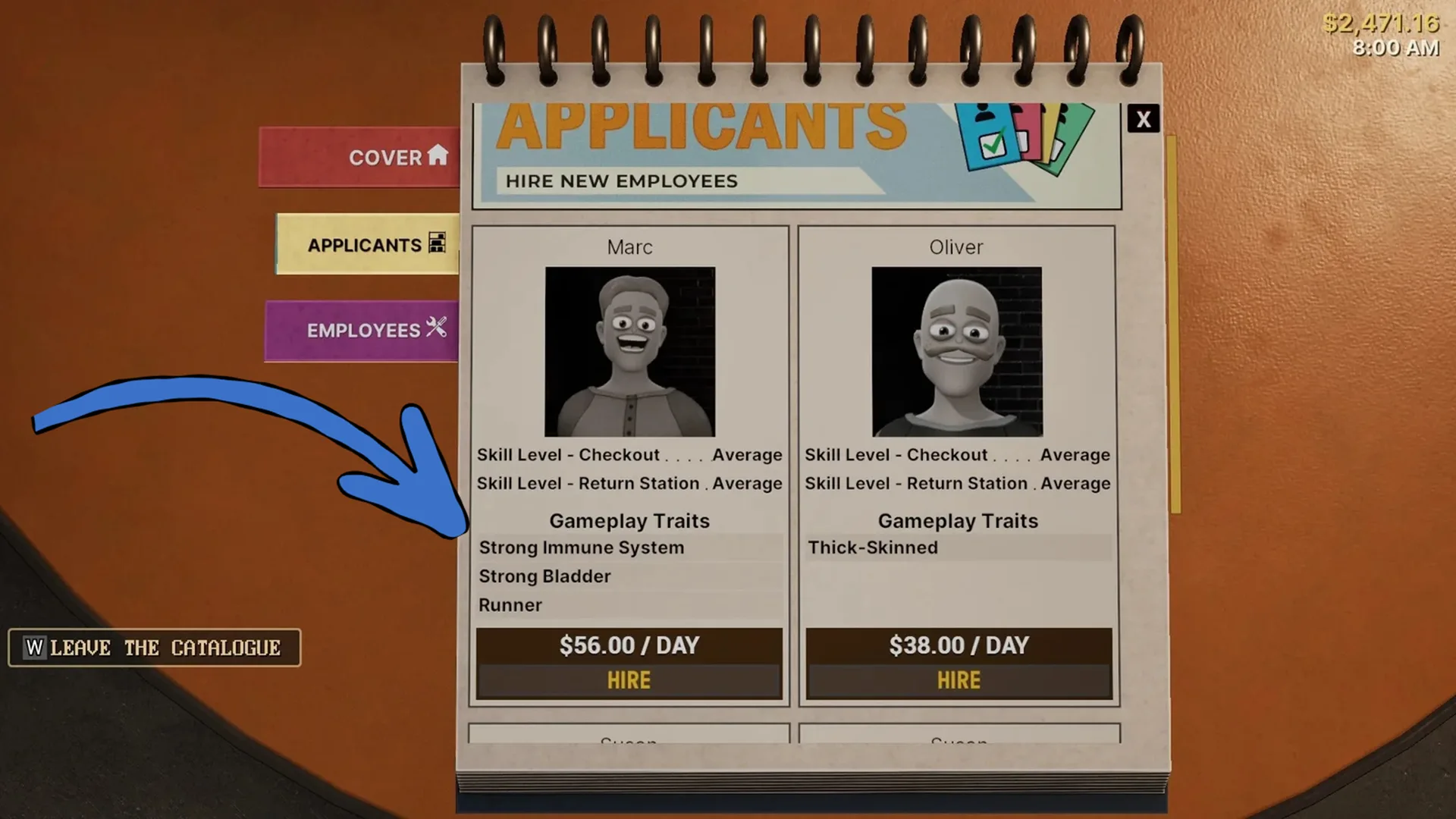
Open the Staff Book anytime, even during mid-day, and you can see two tabs; Applicants (for daily fresh faces), and Employees (your current crew for reassignment or firing).
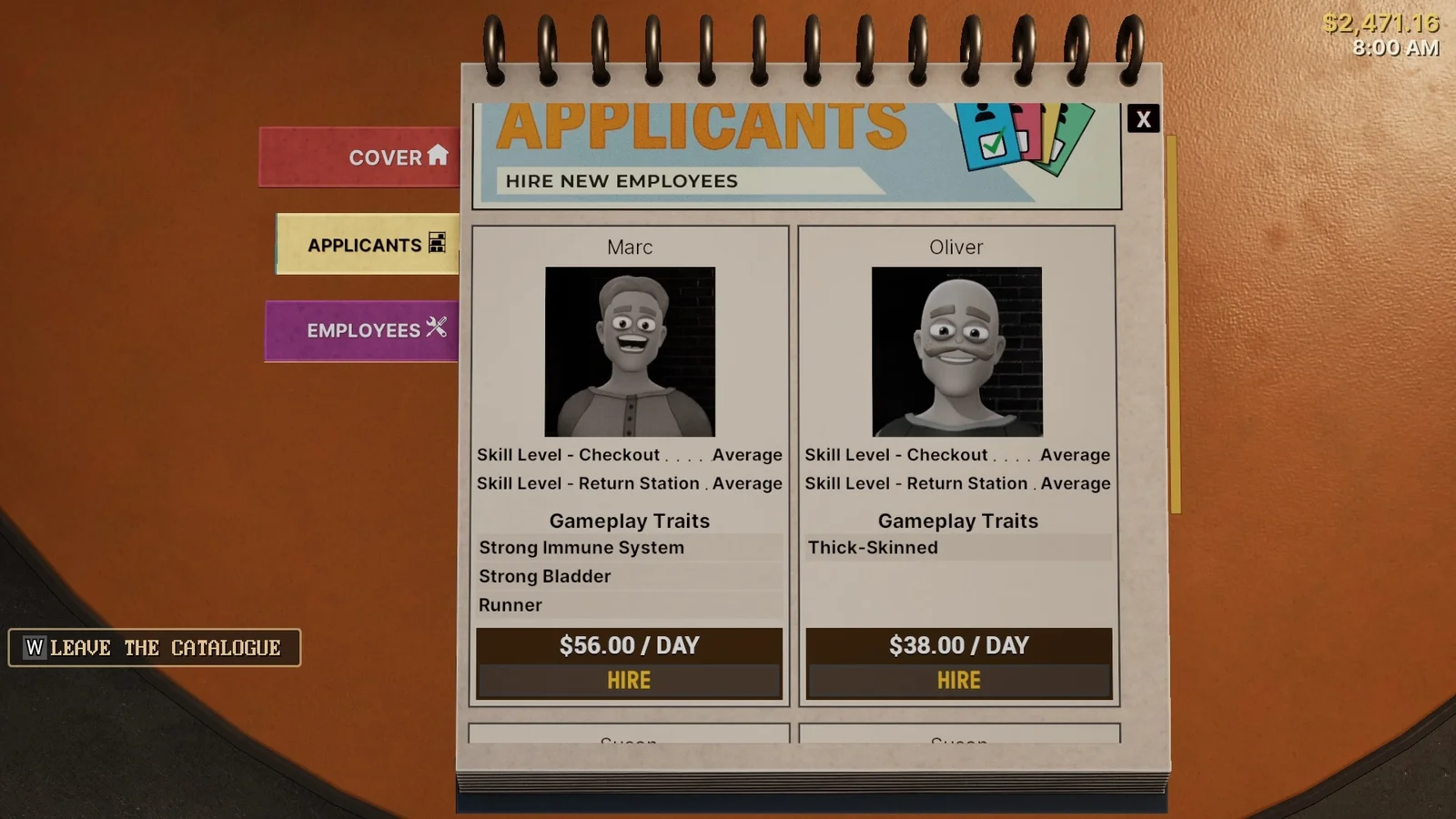
Applicants section gives you access to fresh staff every in-game day with new portraits, skill levels, traits, and pay rates. This is pure 90s retail roulette, some days bring gems while other duds. Check it before opening for the best shot at reliable talent. No complex interviews here; it’s all stats and gut feel.
Every Applicant has two core skill level; Checkout and Return Station. Either the employee is Slow, Average, Good or Fast in these two skills. When deciding who to hire for your video store in Retro Rewind, prioritize Average or better in both, especially Checkout.
Avoid hiring Slow Applicants unless absolutely necessary. If checkout process is slow your counters will create bottlenecks that cascade into complaints, lost sales, and you ending up babysitting the register anyway.
Meanwhile, Gameplay traits are the game changers. They can make really difference but also jack up daily wages. More traits = higher cost, but smarter long-term value.
| Trait | Description | Best Use |
|---|---|---|
| Loyal | Never asks for raises, making them excellent for long-term payroll stability. | Hire immediately if their skills match your needs. |
| Strong Bladder | Does not take bathroom breaks, staying at their station consistently. | Perfect for busy shifts where constant presence is needed. |
| Strong Immune System | Never gets sick, ensuring zero missed workdays. | Great for maintaining consistent staffing without interruptions. |
| Runner | Moves faster around the store, improving efficiency. | Ideal for restocking and general floor tasks. |
| Complaint Handler | Handles customer complaints independently at the register. | Saves time by reducing the need for player intervention. |
| Thick-Skinned | Less affected by negative events during hectic situations. | Useful during peak hours and high-pressure scenarios. |
During early game always go with Applicants that are Loyal, have a Strong Immune System, and a Strong Bladder. These are employees that run on auto pilot. Just make them sit at the counter and forget about it.
Never go for Slow workers or high maintenance types unless you are in desperate need of staff. Saving money doesn’t make sense when hiring employees in Retro Rewind. A $56/day Loyal Runner with Fast Checkout will outperform a $38 cheapskate who naps on the job.
- Once you decide who to hire:
- Open the Staff Book.
- Flip to Applicants.
- Scan portraits and stats, hover for full details.
- Click Hire on the bottom of their card. They start the next day.
You can fire and hire anyone on a dime so if a superstar Applicant appears, get rid of the slacker or less efficient worker. Always put your best employee at the Checkout counter. One at the Returns and assign two to overnight returns before doors open. These frees you for decor upgrades or new stock buys.