

In Starsand Island you explore the island, and while exploring resources are collected in your bag. Your progress in Starsand Island can be stalled if you don’t have enough space in your bag. The best part is you don’t need to craft anything or visit a shop; the bag upgrade option is hidden right inside your inventory. As long as you have the materials for the upgrade you can increase bag space in Starsand island anytime.
Default Slot Space: 30
How to expand bag space in Starsand Island
By default, you will start at 30 slots, and you can get additional 40 slots by upgrading 8 times in Starsand Island. Each upgrade gives you an extra 5 slots which isn’t that much. Here’s what you will do to increase bag/inventory space:
- Open your bag/Inventory
- Press B for PC
- Press D pad Up for controller
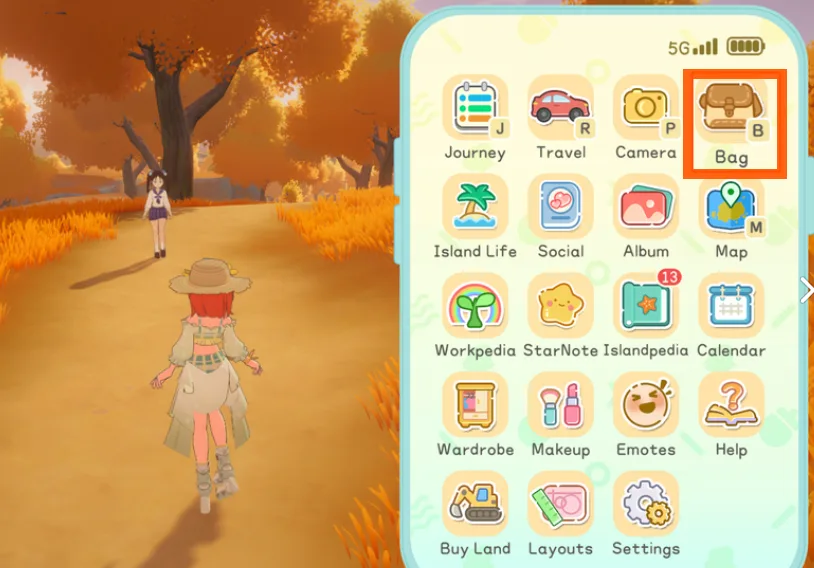
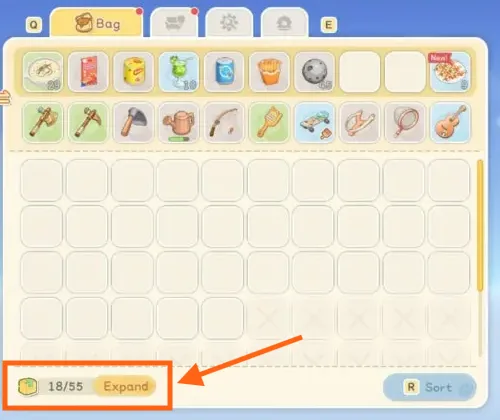
- From the inventory under the bag tab click on “Expand“
- A pop up will appear under the name of Upgrade Bag, giving details of the materials needed for the upgrade.
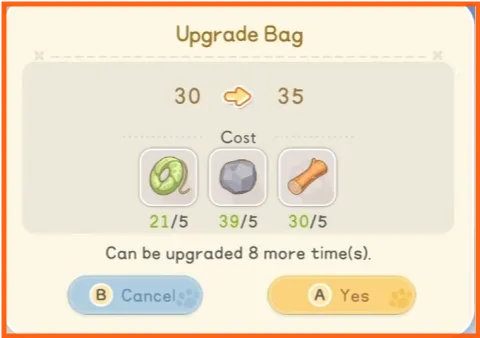
- If you have the required materials, click Yes to confirm the expansion.
Here’s a list of all the required materials that you need to upgrade for each slot:
| Upgrade | Slots After | Materials Required |
|---|---|---|
| Base (Available by default) | 30 | |
| Upgrade 1 | 35 | 5× Softwood • 5× Stone • 5× Fiber |
| Upgrade 2 | 40 | 5× Carbon Line • 5× Stone Brick • 5× Softwood Plank |
| Upgrade 3 | 45 | 5× Radiant Core • 5× Copper Ingot • 5× Glass Pane |
| Upgrade 4 | 50 | 6× Bronze • 16× Flour • 6× Flannel • 6× Carbon Line |
| Upgrade 5 | 55 | 7× Hardwood Plank • 7× Iron Sheet • 10× Vegetable Juice • 5× Egg • 10× Protein Powder • 10× Fruit Pulp |
| Upgrade 6 | 60 | 6× Premium Wood Plank • 5× Alloy • 10× Sugar • 3× Sheep Milk • 10× Fish Fillet |
Hopefully this will help you in increasing your slot space in Starsand Island. You can read more about Starsand Island: How to Unlock Every Vehicle, How to Mine Iron Ores in Starsand Island and Starsand Island: How to Upgrade Worktables I-III