


Cairn from The Game Bakers is a great game that is best enjoyed through a controller. Since PlayStation controllers are most popular, most PC gamers prefer using them on Windows and Linux. Unfortunately, Linux users are facing an annoying issue with HD Rumble.
Cairn has native DualSense haptic feedback support, but on Linux it often fails due to how PipeWire/WirePlumber handles the controller’s audio device (which powers the advanced HD rumble via the back two channels of its 4-channel output).
To fix PS5 Dualsense Linux HD Rumble issue we need to force the correct audio profile and naming, so Cairn sends haptic data properly.
Main Fix: Create a WirePlumber Configuration Rule
The most common working fix for this error is creating a WirePlumber configuration rule for Cairn or any other game where you might be facing this issue. Open the terminal and create this directory structure:
- ~/.config/wireplumber/wireplumber.conf.d/
Inside the last directory create a file named “90-dualsense.conf”. Now you need to open this newly created file and paste the following code:
monitor.alsa.rules = [
{
matches = [
{
device.name = “~alsa_card.usb-Sony_Interactive_Entertainment_DualSense.” } ] actions = { update-props = { “api.alsa.use-ucm” = false, “device.profile-set” = “analog-surround-40.conf” } } }, { matches = [ { node.name = “~alsa_output.usb-Sony_Interactive_Entertainment_DualSense..analog-surround-40″
}
]
actions = {
update-props = {
“node.description” = “Wireless Controller”,
“node.nick” = “Wireless Controller”,
“audio.format” = “S16LE”,
“audio.rate” = 48000,
“node.force-rate” = 48000,
“channelmix.disable” = true,
“priority.driver” = 1500,
“priority.session” = 1500
}
}
}]
This is what it should look like:
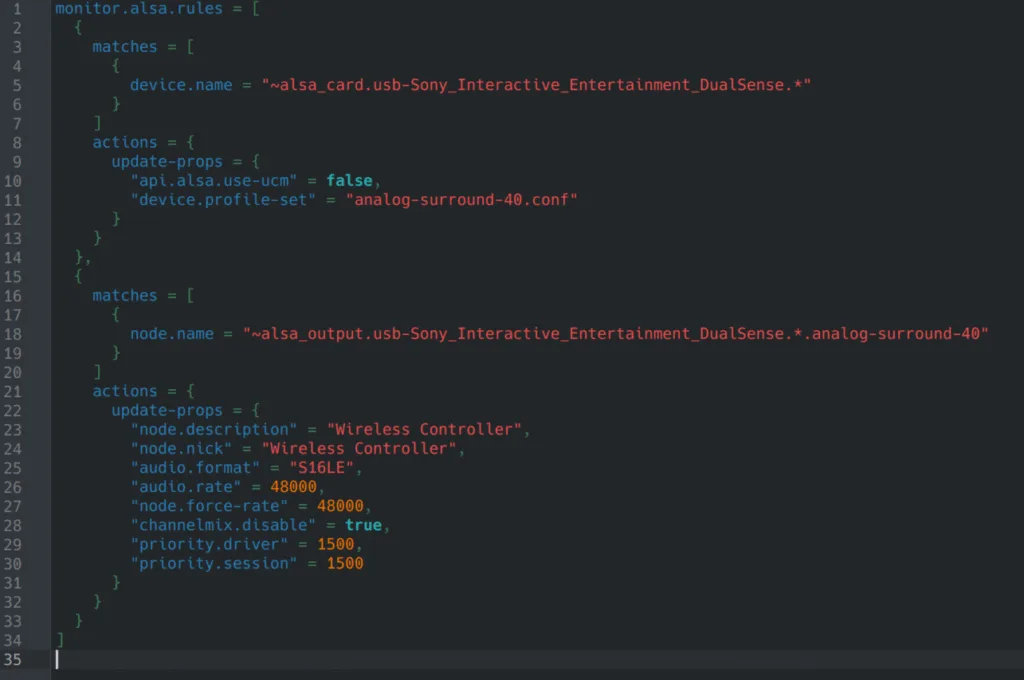
Save the file and activate the following rule:
- systemctl –user restart wireplumber pipewire pipewire-pulse
Save and exit the file.
The final step is to connect your DualSense controller with a USB connection because the Rumble doesn’t work wirelessly. Restart your game (with Steam input disabled) and it should work just fine now. HD rumble should now work. Test it during climbing, combat, or any feedback-heavy moment.